
XAMPP issue in Window Port 80 in use by “Unable to open process” with PID 4!
XAMPP issue in Window Port 80 in use by “Unable to open process” with PID 4!
If you are a PHP developer, PHP developer and having a still an issue in exam. localhost PHPmyadmin.
The issue can be defined on live server but on localhost window user the error can be same. By following few steps you can solve out this problem.\
Before understanding of localhost troubleshooting with MySQL and Apache server.
 Problem detected!
12:41:58 PM  [Apache]  Port 80 in use by "Unable to open process" with PID 4!
12:41:58 PM  [Apache]  Apache WILL NOT start without the configured ports free!
12:41:58 PM  [Apache]  You need to uninstall/disable/reconfigure the blocking application
12:41:58 PM  [Apache]  or reconfigure Apache and the Control Panel to listen on a different port
12:41:58 PM  [mysql]  Problem detected!
12:41:58 PM  [mysql]  Port 3306 in use by "Unable to open process"!
12:41:58 PM  [mysql]  MySQL WILL NOT start without the configured ports free!
12:41:58 PM  [mysql]  You need to uninstall/disable/reconfigure the blocking application
12:41:58 PM  [mysql]  or reconfigure MySQL and the Control Panel to listen on a different port
or Error Can be
1:45:40 PM  [mysql]  Error: MySQL shutdown unexpectedly.
1:45:40 PM  [mysql]  This may be due to a blocked port, missing dependencies,
1:45:40 PM  [mysql]  improper privileges, a crash, or a shutdown by another method.
1:45:40 PM  [mysql]  Press the Logs button to view error logs and check
1:45:40 PM  [mysql]  the Windows Event Viewer for more clues
1:45:40 PM  [mysql]  If you need more help, copy and post this
1:45:40 PM  [mysql]  entire log window on the forums
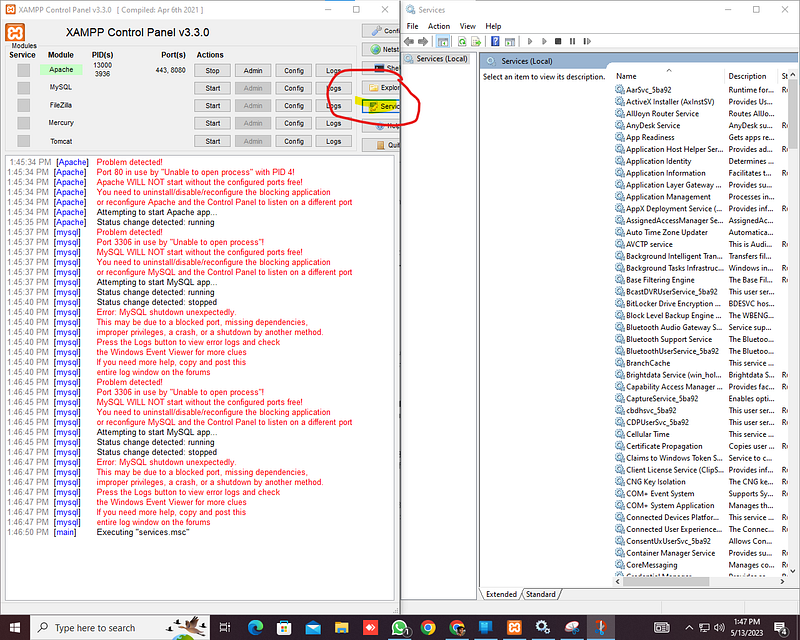
Open XAMPP go to Servius the you will find the system will be using SQL on 80 port

you just need to go and Stop this iS MYSQL ON 80 by Dabble Clinking on
Reason
The error is Coming on The area Because there is Multiple Sql is running on server :
Solution
you just need to go and Stop this is MYSQL ON 80 by Dabble Clinking on
Donate



0 Comments